ByJohn A
Enclosed CNC Routers vs Diode Laser Engravers: Choosing Your First Desktop Machine
The desktop fabrication revolution has made it easier than ever for hobbyists, woodworkers, and small business owners to turn ideas into tangible products. Whether you want to carve intricate 3D designs into hardwood, craft custom acrylic signage, or engrave personalized leather goods, desktop manufacturing tools have become accessible, affordable, and remarkably powerful.
However, when choosing your very first desktop fabrication machine, you will likely face a major decision: Should you buy an enclosed CNC router or a diode laser engraver?
While both technologies sit comfortably on a workbench and read digital design files, they operate on completely different principles. In this comprehensive guide, we will break down how each machine works, their material capabilities, safety features, learning curves, and operational costs so you can confidently pick the right tool for your workshop.
Understanding the Core Differences
To make the right investment, you first need to understand how these machines shape and manipulate materials.
What is an Enclosed Desktop CNC Router?
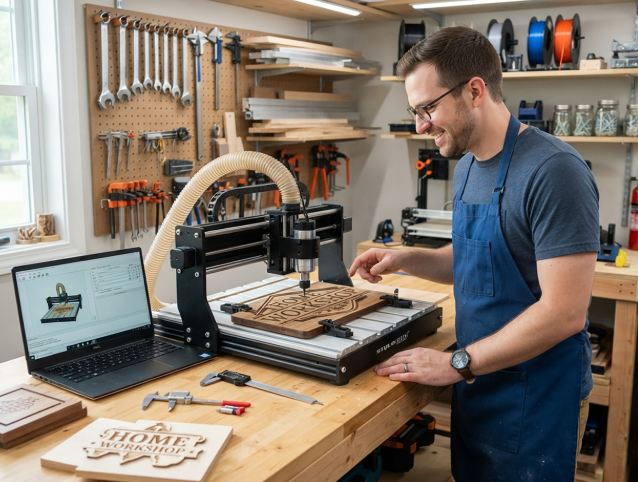
A CNC (Computer Numerical Control) router is a subtractive manufacturing tool that uses a high-speed rotating spindle and sharp cutting bits to physically carve away material. It moves in three main axes (X, Y, and Z) to perform operations like carving, drilling, slotting, and 3D relief sculpting.
Modern desktop models often feature built-in protective structures. Investing in a high-quality enclosed desktop CNC router provides a controlled environment that keeps wood dust, acrylic chips, and mechanical noise contained while maintaining superior precision during deep carving tasks.
What is a Diode Laser Engraver?
Unlike a mechanical router, a diode laser engraver relies on a concentrated beam of light to burn, vaporize, or mark surfaces. It is primarily a thermal tool. High-power optical laser modules focus light onto a tiny focal point, allowing you to engrave high-detail photos or cut through thin sheets of wood, leather, and acrylic.
Choosing a reliable diode laser engraver gives makers a fast, non-contact method to perform surface etching, intricate paper cutting, and dark wood marking without needing mechanical hold-down clamps or physically wearing down cutting tools.
Feature Comparison: CNC Router vs Diode Laser
To get a clearer picture of how these two machine types perform side-by-side, take a look at the feature comparison below:
| Feature / Aspect | Enclosed CNC Router | Diode Laser Engraver |
| Primary Action | Mechanical carving, drilling, cutting | Light-based burning, etching, vaporizing |
| 3D Capabilities | Full 3D reliefs, carves, and contours | 2D cutting and surface etching only |
| Material Thickness | Handles thick stock (10mm to 50mm+) | Best for thin stock (1mm to 10mm cutting) |
| Noise Level | High (spindle motor + vacuum dust collection) | Low (only small cooling fans running) |
| Safety Concerns | Flying debris, high-speed rotary bits | Optical eye hazards, smoke, fire risk |
| Consumables | End mills, bits, spoilboards | Laser lenses, focal lenses (infrequent) |
| Working Environment | Needs dust collection/vacuum setup | Needs good smoke ventilation/exhaust system |
Deep Dive: Material Compatibility and Applications
Your choice of machine ultimately depends on what you plan to make.
1. Working with Wood and MDF
- CNC Router: Clear winner for 3D wood processing. A CNC router can carve bowls, trays, 3D relief maps, and joinery directly into hardwoods like oak, maple, and walnut.
- Diode Laser: Great for thin plywood cutting and detailed surface burns. However, lasers leave charred, dark edges on cut wood that may require light sanding.
2. Metals and Hard Materials
- CNC Router: Desktop CNC routers can cut soft non-ferrous metals like aluminum and brass when using the proper feed speeds, lubricants, and rigid bits.
- Diode Laser: Standard diode lasers cannot cut through metals. Higher-wattage models can mark coated metals or stainless steel, but they cannot perform true metal cutting.
3. Acrylic and Plastics
- CNC Router: Cuts all types and colors of acrylic (both cast and extruded) without melting, provided your feed rates are set correctly.
- Diode Laser: Excellent at cutting clear or colored cast acrylic, but diode lasers (specifically blue light diode lasers) struggle to cut transparent or clear glass/acrylic because the light beam passes right through without absorbing heat.
Safety, Noise, and Workshop Environment
Safety and comfort are vital factors, especially if your workshop is located inside an apartment, basement, or garage.
Safety Concerns
- CNC Safety: The main hazards of a CNC router are mechanical—flying chips, broken bit shards, and spinning spindles. An enclosed frame absorbs these impacts and keeps hands away from moving parts.
- Laser Safety: Lasers pose optical hazards. Direct or reflected beam exposure can damage human vision permanently. Proper eye protection safety glasses or filtered enclosure windows are mandatory. Smoke and fumes produced by burnt materials also require an active air filter or window exhaust fan.
Noise and Dust vs. Fumes and Smoke
- CNC Environment: Routers are loud. The combination of a high-RPM spindle motor cutting hard wood and a dust extractor produces significant noise. An enclosure helps dampen sound considerably.
- Laser Environment: Diode lasers operate silently. However, they create smoke, soot, and toxic fumes when cutting synthetic plastics or resin woods. Good room ventilation or an active air exhaust system is non-negotiable.
Software and Learning Curve
Both machine types rely on digital workflows, but their software requirements differ slightly:
- CAD/CAM for CNC Routers: Working with a CNC machine usually requires a two-step software chain. You create your design in a CAD (Computer-Aided Design) program, then generate toolpaths using CAM (Computer-Aided Manufacturing) software to specify bit sizes, feed speeds, and cut depths.
- Laser Software: Laser software (such as LightBurn or LaserGRBL) is extremely user-friendly. You can drag and drop vector graphics (SVG, DXF) or raster images (PNG, JPG), set speed and power percentages, and press start immediately.
Final Verdict: Which Machine Should You Buy First?
Choose an Enclosed CNC Router if:
- You want to create 3D carved items like bowls, wooden signs, relief sculptures, or mechanical parts.
- You need to work with thick hardwood blocks, aluminum, or clear acrylic sheets.
- You want a clean work area free of airborne dust and loud motor noise in your home workshop.
See also: Which Cash Advance Options Work Best for Businesses with Irregular Revenue?
Choose a Diode Laser Engraver if:
- Your primary goal is fine detail surface photo engraving, leather crafting, or paper artwork.
- You prefer a quiet machine that takes up less vertical space and has a minimal initial learning curve.
- You work mostly with thin sheet materials and lightweight crafts.
Both tools complement each other exceptionally well. Many makers start with a laser engraver for quick, precise personalization and later add an enclosed desktop CNC router to handle heavy structural woodworking and 3D shapes. Assess your space, material goals, and budget to choose the machine that best fits your creative vision!